FileSalvage

FileSalvage
License:
Demo
Language:
English
Developer:
Developer's website
OS:
Mac OS X
Updated:
See detailed info

Softonic review

Nick Mead

“Recover deleted or corrupted files on any media”

by Nick Mead about FileSalvage

There's nothing worse than going to open a file and finding that it's either been corrupted or the data has been somehow deleted.

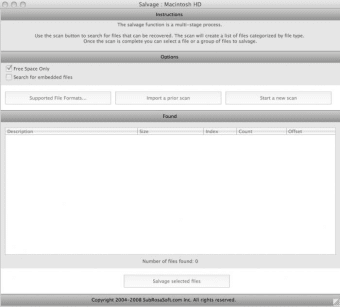
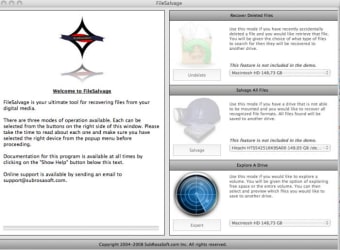
FileSalvage is a simple data recovery program that aims to retrieve files that have been deleted, rescue data from corrupted media and recover lost files from storage devices. This includes internal and external storage. There are three modes available - Recover Deleted Files, Salvage All Files and Explore A Drive. Unfortunately, in the trial only the last option is available.

Explore a Drive allows you to perform an exhaustive scan to locate lost partitions and files. If FileSalvage finds any, you are presented with a view of the files so that you can copy lost files to a safe location such as an online drive or external drive. Note that in this trial, you can only preview those files that you want to save. The good thing is that FileSalvage works with just about anything from CD-ROMS to USB and Firewire drives - just about any storage device connected to your Mac in fact.

You can customize scans to allow FileSalvage to exclude certain files or even add custom files for programs that it would otherwise ignore. Of course, it's impossible to assess how successful recoveries are as the trial doesn't allow it but it seems extremely through, if a bit slow in scanning.

FileSalvage could save your bacon if you've lost a valuable file or had it corrupted no matter what the storage device.

Pros
  • Works with just about any storage media
  • Three different recovery modes
  • Scans can be customized
Cons
  • Trial doesn't full recovery
  • Scans can take a while
Download FileSalvage 6.1.7

FileSalvage is virus free

We have analyzed the latest version of FileSalvage with 30 antivirus engines and it is virus free. See analysis results.

TESTED VIRUS FREE - Softonic GUARANTEED

Review and rate FileSalvage

Your avatar

Your opinion is important.
Help other users - be the first to review this program.

Review
  1. Maximum: 75 characters

  2. See example

Pros and Cons
Rate
  1. What rating would you give FileSalvage?

    You need to fill in all fields

    • Usability:

      Not rated
    • Stability:

      Not rated
    • Installation:

      Not rated
    • Functionality:

      Not rated
    • Appearance:

      Not rated
    • Overall rating:

      Not rated
  2. Don't worry, we won't make your email address public.

You're not allowed to share serial numbers, cracks, etc. or link to pages that contain them. If you do, your user account will be deleted, your IP address logged and legal action will be taken.

Get started - just ask a question!

Write a title for your question.

Alternativesto FileSalvage

  • In English:
    NameChanger
    NameChanger

    Batch rename file names

    Softonic rating:
    • 8/10
    User rating:
    • 9/10
  • Free:
    Preferential Treatment
    Preferential Treatment

    Verify that preferences files are not corrupt

    Softonic rating:
    • 9/10
    User rating:
    • 10/10
Compare with FileSalvage

Screenshots from FileSalvage

Download rank: Disk & Files

48 of 97

Softonic rating:
  • Good
  • 7/10
Your rating:
Your rating
  • 0

Review and rate this program

Blog posts about FileSalvage

More

Top Downloads: Disk & Files

  • United States
  • Global

  1. Share, store and save your files online

Reviews of FileSalvage in other languages